Yuhox OneAd.
Accounts across many ad platforms in one view; leads stay in your own hands.
How to start
See the price and order
After payment, the license appears under Console → My licenses. Nothing is issued until the money arrives.
Collect the license in the software
In System settings → License, click “Get license with Yuhox account”. You do not copy a license code.
Machines without internet
Use Console → Offline activation / transfer. The license code is a secret; it is masked by default.
What it solves
Ads run across nine platform dashboards, but the leads stay with the platforms. Switching channels means rebuilding your customer base from scratch; a broken conversion callback doesn't throw an error — costs just climb day by day. OneAd puts accounts, campaigns, creatives, and review status into one console, and leads captured by the landing page go into your own database — spend and conversions reconcile.
Before and now
| Before | Now |
|---|---|
| Switching between nine ad platform dashboards — changing one budget means remembering nine different interfaces | Authorize once, view in one place — build campaigns, adjust budgets, upload creatives, and check review status all in one site |
| Leads stay with the ad platform — switching channels means rebuilding your customer base | Leads from the landing page go into your own database, phone numbers are encrypted, lists are masked, and viewing is logged |
| When the conversion callback breaks, there's no alert — you only notice costs spiking at month-end | The callback health check finds missing conversion goals, unbound campaigns, and missing click IDs |
| Leads come in with no one to pick them up, or get assigned manually in a chat group | WeCom lead-generation QR codes rotate automatically, keeping private-domain follow-up on the same chain as ad delivery |
Core capabilities
- 01
Many ad platforms, one place to look
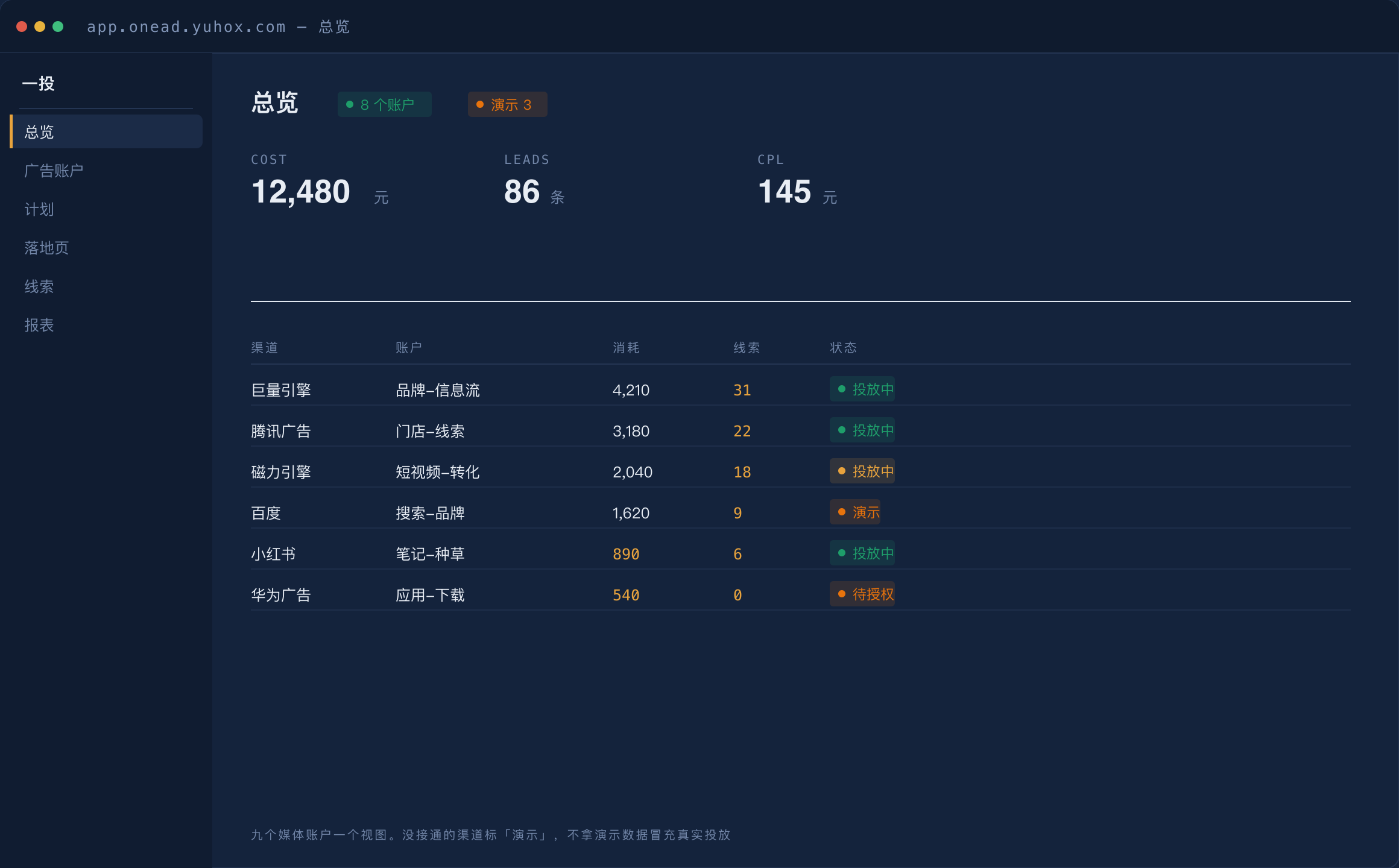
Ocean Engine is wired to the real interface: campaigns, budgets, creatives, review status, audience packages and ad comments are all handled in-app. Eight more channels — Tencent / Kuaishou / Baidu / Xiaohongshu / Weibo / OPPO / vivo / Huawei — sit in place under the same capability manifest, marked "demo" in the UI, and each flips to live as its credentials are approved. What each channel can do is told to you before you click; no buttons that only error after clicking.
- 02
Leads are yours
Leads captured by the landing page are stored in your own database — phone numbers are stored encrypted, lists are masked by default, and viewing a full number is logged every time. Switching ad channels doesn't mean rebuilding your customer base.
- 03
Callback health check
When the conversion callback breaks, the platform doesn't throw an error — costs just climb day by day. This page catches that silent failure: whether the conversion goal is configured, whether the campaign is bound, whether the click ID is missing.
- 04
Private-domain follow-up
WeCom lead-generation QR codes rotate automatically, along with customer groups, WeChat customer service, and script templates — leads get picked up the moment they arrive.
- 05
Spend and conversions reconcile
Reports broken down across multiple dimensions, including discounted actual spend and ROI computed on actual spend — every cent ties to every lead.
- 06
Someone's watching at night too
Campaign monitoring comes with alert thresholds; when a threshold is crossed the campaign is paused automatically, so nobody has to sit in the ad console all night.
- 07
Two delivery forms
The SaaS edition works out of the box; the desktop edition keeps data on the customer's own machine — we only provide the tool. Since leads are personal data, this choice is about more than just deployment.
Who it is for
Merchants running their own performance ads
Don't want to get lost across nine dashboards just to change a budget
Agencies and managed-service providers
Leads are your own asset — they don't disappear when a customer switches channels
Teams that care about compliance
Viewing a full phone number requires authorization and is logged; the same applies to exports and shares
Why this one
Leads don't stay with the ad platforms
The landing page is yours, the database is yours. Switching ad channels doesn't mean rebuilding your customer base.
If it's not connected, it's marked as a demo
Channels without approved qualifications run on a demo adapter, clearly labeled "Demo" on screen — demo data is never passed off as real ad delivery.
We don't handle top-ups on your behalf
Ad account top-ups at every platform go through corporate wire transfer — none of them offers third-party top-ups. The page states this plainly and links out; it won't offer a button that does nothing when clicked.
The SaaS version has no local sign-in page
Production sign-in goes through the unified id.yuhox.com login. If you already use another Yuhox product, you don't need a separate account.
Key parameters
| Form | Desktop-first, with the SaaS console still available for sign-in |
|---|---|
| Account | The desktop edition uses a local account; the SaaS version uses unified Yuhox sign-in |
| Pricing | The desktop edition is priced the same as Stage: CNY 1/day, CNY 182.50/year. No server cost. |
Up front
Can I run real ads right now?
Ad platform qualification review takes weeks. Channels not yet approved run on a demo adapter, labeled "Demo" on screen.
How do I buy the desktop edition?
Priced the same as Stage: CNY 1/day, CNY 182.50/year. After payment, the site issues a license voucher — claim it in the app. It's tied to this one machine.
Do I need to register another account?
Not for the SaaS console — sign in to app.onead.yuhox.com with your Yuhox account. The desktop edition uses a local account.
Can you top up my ad account for me?
No. Top-ups at each platform go through corporate wire transfer and contract accounts — we won't build a button that does nothing when clicked.
Hard constraints in the system
These are gates in the software — even a code change is not allowed to remove them. What is in the contract still governs.
Channels that aren't connected yet are clearly marked as a demo
Ad platform qualification review takes weeks. Channels not yet approved run on a demo adapter, clearly labeled "Demo" on screen — demo data is never passed off as real ad delivery.
Viewing a full phone number requires separate authorization and is logged
Lead lists are masked by default. Viewing a full number is a separate permission, logged every time — who viewed whose number and when. The same applies to exports and shares.
We don't handle ad account top-ups on your behalf
Top-ups at every platform go through corporate wire transfer and contract accounts — none of them offers a top-up-on-behalf interface. The page states this plainly and links out; it won't offer a button that does nothing when clicked.
One account, multiple systems
If you use several Yuhox systems, one account covers them all. No separate accounts or passwords per system.
Buy the desktop edition
Open onead.yuhox.com pricing, pay, then claim your license in the app.